 Watchd
What’s inside your TV Time export, and what to do with it
TV Time shut down on July 15, 2026. The app is gone, and the tool for requesting your data is offline. If you saved your export before the shutdown, that file is now the only copy of your watch history anywhere.
I build Watchd, an iPhone app that imports TV Time exports, so I’ve spent a lot of time inside these files: our importer was checked against anonymized real exports from different years. Here is what’s in them, how to open them, and where you can take your history next.
Which file do you have?
There are two kinds of TV Time exports that people usually have:
| Official Data Request | TV Time Out Extension | |
|---|---|---|
| File name | tv-time-personal-data.zip | tvtime-export-….zip |
| Where it came from | The official GDPR data request emailed to you by TV Time | The third-party browser extension "TV Time Out" (using the "Export my data" button) |
| Watch history | tracking-prod-records-v2.csv, tracking-prod-records.csv, in the oldest archives seen_episode.csv | tvtime-series-episodes.csv and tvtime-movies.csv, or the same data as tvtime-series.json and tvtime-movies.json |
Not sure where yours is? Check your Downloads folder, the email from TV Time, iCloud Drive and Google Drive.
What’s inside the data request archive
The archive holds a lot of CSV files, but only a few of them record what you watched:
tracking-prod-records-v2.csv: your watched episodes.tracking-prod-records.csv: your watched movies and part of your episodes.seen_episode.csv: watched episodes, in the oldest archives.
Not every row in these files is a watch. Some are the shows you followed, your “to watch” list or stats. Real watches have a key that starts with watch- or rewatch-, or a type of watch or rewatch.
The other files cover things like comments, reactions and ratings. They have the same show, season and episode columns, so they are easy to mistake for history, but they don’t say what you watched.
What’s inside the TV Time Out export
tvtime-series-episodes.csv: episodes of your shows, including the ones you hadn’t watched yet. Theis_watchedcolumn tells them apart: onlytruerows are your history.tvtime-movies.csv: your movies, with their title and year.tvtime-series.jsonandtvtime-movies.json: the same data in JSON. The series file goes show, then seasons, then episodes, each withis_watched.
Shows and movies come with TVDB and IMDb IDs, which helps other apps find the right title. The extension's export can be password-protected. If the ZIP asks for a password, unzip it with that password first and use the files inside.
Five things that trip people up
Worth knowing if you open the files yourself or your import looks wrong:
- Column names changed over the years. The season number can be in
season_number,s_no,episode_season_numberorseason, the episode number inepisode_number,ep_noorepisode. In the same file one can be empty while the other is filled. tvdb_idisn’t always the show. In the episodes file of the TV Time Out export,tvdb_idis the ID of the episode. Matching shows by it brings up the wrong ones.- Dates hide in different places. Usually in
watched_atorwatch_date. Older archives keep the exact time of a watch inside the key itself, likewatch-date-1624524048, which is a Unix timestamp. - Movie titles can be in your language. Older archives store the movie name the way you saw it in the app, for example in Korean, and an English one inside a key like
watch-alpha-space-sweepers. - Rewatches are separate rows. A show you watched twice appears twice, so counting rows overcounts.
How to open the files
- On iPhone: open the Files app and tap the ZIP. It unpacks into a folder next to it. CSV files open in Numbers.
- On a Mac: double-click the ZIP, then open the CSV files in Numbers, Excel or Google Sheets.
Look, but don’t save over the originals. Spreadsheet apps like to reformat dates and long numbers, and an importer may not recognize the file afterwards.
Keep a safe copy
TV Time no longer exists, so there is no way to download this file again. Keep at least two copies, for example one in iCloud Drive or Google Drive and one on a computer or in an email to yourself. Keep the original ZIP even after you import it somewhere: if you switch apps later, you’ll need it again.
Where you can import it
Several trackers accept a TV Time export. Three that I checked:
- Watchd (iPhone, free, no account). Reads both kinds of exports, or the CSV and JSON files from them, entirely on your phone. Brings over watched episodes and movies with their dates; finished shows go to Watched, the rest to Watching. Doesn’t bring over ratings, comments, rewatches (each episode keeps the date of its first watch) or shows you never started. Step by step: how to move your TV Time history to Watchd.
- Trakt (web, iOS, Android). Imports TV Time exports, along with IMDb, Letterboxd, CSV and JSON files. Needs an account, and the free plan limits list sizes.
- Serializd (web, iOS, Android). Imports from TV Time and Trakt. TV shows only, no movies, and it needs an account.
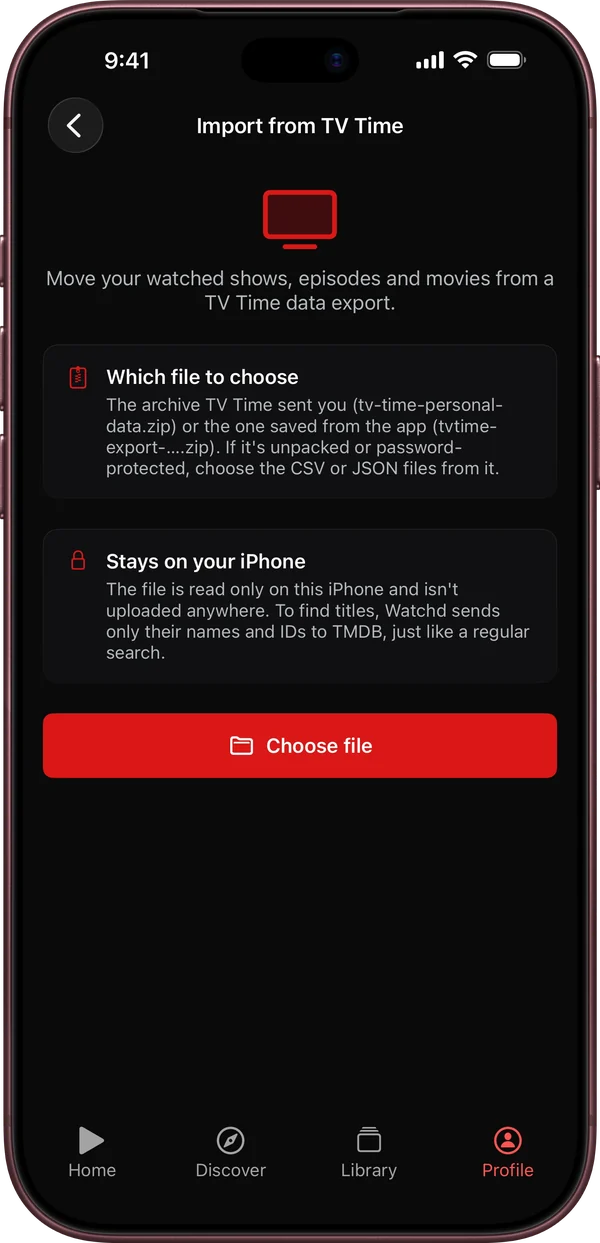
Whichever app you pick, check what actually came across: watch dates, movies, rewatches and anime. Anime often has different season numbering on TV Time and in the databases these apps use, so some episodes may not match. A side-by-side comparison of Watchd, Trakt, Serializd and Letterboxd is here.
Quick answers
Can I still get my data from TV Time? No. TV Time shut down on July 15, 2026, its data request tool is offline, and personal data was deleted after the shutdown.
Do I need to unzip the file to import it into Watchd? No, pick the ZIP itself. Unzip it only if it’s password-protected, then pick the CSV or JSON files inside.
Will importing the same file twice create duplicates in Watchd? No. A second import only adds what’s missing.
Is my file uploaded anywhere when I import into Watchd? No. It’s read only on your iPhone. To find titles, Watchd sends only their names and IDs to TMDB, like a regular search.
Watchd is not affiliated with TV Time or Whip Media. TV Time is a trademark of its owner.