 Watchd
TV show trackers that work without an account: where your data actually lives
I found eleven TV show trackers on iPhone that let you start without signing up: Watchd, ShowTracker, two different apps called Marquee, Previously, Showline, Sequel, TV Forecast, Television Time, Sofa Time and TV Club. On Android the best-known one is SeriesGuide. No account doesn’t always mean your history stays on the phone, though. Most of these apps keep your library in your own iCloud, Watchd and SeriesGuide keep it on the device, and one of them shows ads and declares tracking. Below is where each app stores your watch history, what its privacy label says and whether it has ads. I make Watchd, so I kept to what the App Store, Google Play and the apps’ own pages say. Everything was checked on October 27, 2026, in the US App Store.
Three places your watch history can live
| Where | What it means | The catch |
|---|---|---|
| Only on your phone | Your list of watched episodes never leaves the device | Lose the phone without a backup file and the history is gone; no sync |
| Your own iCloud | The app syncs through your Apple account, not through the developer’s server | Apple devices only; moving to Android takes an export |
| The developer’s server | Works on the web and on any phone | You need an account, and the company holds your history |
The third option is the one TV Time users learned about the hard way: after it shut down on July 15, 2026, only people who had saved an export kept their history.
No tracker is fully offline. Titles, episodes and air dates come from a database such as TMDB or TheTVDB, so every app sends searches and title IDs over the internet. What differs is whether your own list goes anywhere.
TV show trackers without an account, compared
| App | Runs on | Account | Where your library lives | What the app collects | Ads |
|---|---|---|---|---|---|
| Watchd | iPhone | No | Only on your iPhone, plus a backup file you save | No analytics or trackers | No |
| ShowTracker | iPhone, iPad, Mac | No | On the device, mirrored to your iCloud | Data Not Collected | No |
| Marquee: TV & Movies | iPhone, iPad, Mac | No | Your iCloud, weekly backup to iCloud Drive | Data Not Collected | No |
| Marquee: Private TV Tracker | iPhone, Mac | No | On the device, backed up to your iCloud | Usage and diagnostics, not linked to you | No |
| Previously | iPhone, iPad, Mac | No | On the device, synced through your iCloud | Usage data and identifiers, not linked to you | No |
| Showline | iPhone, iPad, Mac | No | Your iCloud; Trakt with Premium | Data Not Collected | No |
| Sequel | iPhone, iPad, Mac | No sign-up of its own | Your iCloud; Trakt optional | Analytics (Mixpanel), not linked to you | No |
| TV Forecast | iPhone, iPad | No sign-up of its own | Your iCloud; Trakt optional | Analytics (Firebase), not linked to you | No |
| Television Time | iPhone, iPad, Mac | No sign-up of its own | iCloud, or Trakt with Plus | Purchase history only | No |
| Sofa Time | iPhone, iPad, Mac, Android | No sign-up of its own | iCloud, Trakt, Simkl or MDBList | Coarse location, usage and crash data, not linked to you | No |
| TV Club | iPhone, iPad, Mac | No sign-up of its own | Your iCloud | Location, identifiers, usage and purchases used to track you | Yes |
| SeriesGuide | Android | Optional | On your phone; optional SeriesGuide Cloud or Trakt | Optional email and crash logs, nothing shared | No |
The “collects” column is what each developer declares in the App Privacy section of the App Store, or in Data safety on Google Play for SeriesGuide. Developers fill these in themselves. “Not linked to you” means the developer says the data isn’t tied to your identity. “Used to track you” means it can be combined with data from other companies for advertising. The Ads column follows the “Contains ads” mark on the store page.
When the account is optional or required
| App | Runs on | Account | Where your library lives | What the app collects | Ads |
|---|---|---|---|---|---|
| Next Episode | Web, iPhone, Android | Optional | With Next Episode’s service: it survives a reinstall even without an account | Email and user ID linked to you; device ID used for third-party ads | Yes |
| JustWatch | Web, iPhone, Android | Only to sync devices | JustWatch’s servers once you sign in | Identifiers and usage data used to track you | Yes |
| Trakt | Web, iPhone, Android | Yes | Trakt’s servers | Email, user ID and your content linked to you | No |
| Serializd | Web, iPhone, Android | Yes | Serializd’s servers | Email and ad data linked to you; usage data used to track you | Yes |
| Bingers | iPhone, iPad, Mac, Android | Yes, to keep a library | A database on Amazon Web Services in Frankfurt | Email, name, phone and usage linked to you; contacts if you allow it | No |
Simkl needs an account too, and its free version shows ads. These apps make sense if you want your history on the web or on both an iPhone and an Android phone. For free options among them, see the best free Trakt alternatives.
Watchd: on your iPhone and nowhere else
Watchd tracks TV shows, movies and anime on iPhone, and there is nothing to sign up for. Your library, episode progress, ratings and lists are stored only on the iPhone: Watchd has no server with user data, no analytics and no trackers. To show details about a title, the app asks TMDB, sending the search query or title ID without your name, and trailers load from YouTube. It is free, with no ads, subscriptions or in-app purchases. You can bring in a TV Time export or CSV files from IMDb and Letterboxd.
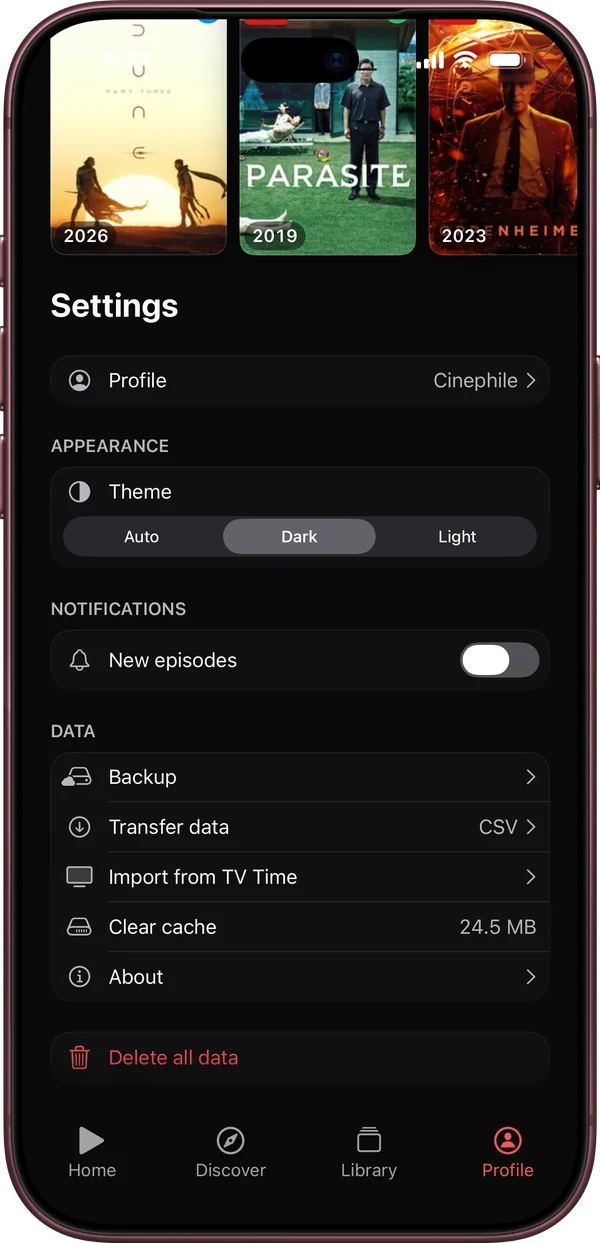
The flip side of keeping everything on the phone: the library doesn’t sync to an iPad or a second iPhone, and deleting the app erases it. Save a copy from time to time (Profile → Data → “Backup” → “Export”) and keep the file in Files or iCloud Drive; on a new iPhone, open it from the same screen with “Import”. Watchd needs iOS 17 or later, and there is no Android or web version. More in the Watchd FAQ.
No account, synced through iCloud
These apps say outright that there is no account, and they use your iCloud to sync between your Apple devices.
- ShowTracker puts it plainly: “No account, no ads, nothing leaving your phone.” The library is mirrored to your own iCloud, and the label says Data Not Collected. It is free, with no in-app purchases.
- Marquee is two different apps from two developers. Marquee: TV & Movies syncs through your iCloud with weekly backups to iCloud Drive, declares Data Not Collected, can connect to a Jellyfin server and sells Marquee Pro for $6.99. Marquee: Private TV Tracker keeps your history on the device with a backup to your iCloud, collects usage and diagnostic data not linked to you, and has no in-app purchases.
- Previously is built around TV shows, caches episodes on the device and syncs through your iCloud. It needs iOS 26 and costs $9.99 a year or $19.99 once for the paid tier.
- Showline dropped its sign-up in an update and now syncs through iCloud, with Data Not Collected. Trakt sync is part of Premium, $14.99 a year.
ShowTracker, both Marquees and Previously are new: when I checked, only ShowTracker had enough ratings for the App Store to show a score, and it had four. That says nothing bad about them, but expect features and policies to change.
Older trackers with no sign-up of their own
These don’t ask you to register with them. They keep your data in iCloud and offer Trakt or other services for sync, and none of their privacy labels lists an email address.
- Sequel tracks TV shows and movies along with books and games. Its privacy policy says your data is stored in iCloud and that it uses Mixpanel for analytics, anonymised. Sequel+ is $19.99 a year.
- TV Forecast stores your shows and progress in iCloud, can sync with Trakt and keeps analytics in Firebase. Premium has a lifetime option for $49.99.
- Television Time syncs over iCloud, or with Trakt on its Plus plan, and declares only purchase history. Plus is $9.99 a year.
- Sofa Time works with iCloud, Trakt, Simkl or MDBList and also runs on Android. Premium is $14.99 a year.
- TV Club syncs through iCloud, but it shows ads and is the only app in the first table that declares data used to track you. Gold Plus is $49.99 a year.
On Android
Most no-account trackers are Apple-only because they rely on iCloud. On Android, SeriesGuide works without an account: your library stays on the phone, you can back it up to JSON files, and signing in is only for optional sync through SeriesGuide Cloud (a paid feature) or Trakt. It is free, open source and has no ads. Its Data safety section on Google Play lists an optional email and optional crash logs, and no data shared with third parties. Sofa Time is the other app from the first table with an Android version.
How to check any tracker yourself
- On the App Store, scroll to App Privacy. “Data Not Collected” is the strongest claim; “Data Used to Track You” means data can be combined with other companies’ data for ads.
- On Google Play, open Data safety.
- In the description, look for where the library lives: “on device”, “your own iCloud”, or an account on the developer’s service.
- Find the export before you need it. Whatever the storage, a file you can take with you is what lets you switch apps later.
Quick answers
Is there a TV show tracker that doesn’t need an account? Yes. On iPhone: Watchd, ShowTracker, Marquee, Previously, Showline, Sequel, TV Forecast, Television Time, Sofa Time and TV Club. On Android: SeriesGuide and Sofa Time.
Which tracker keeps my data only on my phone? Watchd on iPhone. On Android, SeriesGuide, as long as you don’t turn on its Cloud or Trakt sync.
Can a tracker sync between devices without an account? Yes, through your iCloud, on Apple devices only. ShowTracker, both Marquee apps, Previously, Showline, Sequel, TV Forecast, Television Time and TV Club do this.
Which no-account trackers have no ads? All of the first table except TV Club.
Which one to pick
- You want nothing to leave your iPhone and don’t need sync: Watchd.
- You want no account but sync between iPhone, iPad and Mac: ShowTracker or Marquee: TV & Movies (both say Data Not Collected), or Showline.
- You also track books and games: Sequel.
- You’re on Android: SeriesGuide.
- You want your history on the web and on any phone: pick one of the account-based apps and keep its export.
Coming from TV Time? Here are the best TV Time alternatives, and Watchd against Trakt, Serializd and Letterboxd point by point is in the comparison table.