 Watchd
How to keep track of movies and TV shows you’ve watched
The way that lasts is one tracker app where you mark each episode and movie right after you finish it. A notes list or a spreadsheet is fine for a few films a month, and your streaming service’s history covers only what you watched on that service. For series you need something that remembers where you stopped and tells you when the next episode is out. I make Watchd, one of these apps, so I kept to facts you can check. Facts about other apps were checked in October 2026, and prices are from the US App Store.
Four ways to keep track, compared
| Method | What it remembers | Where it falls short | Good for |
|---|---|---|---|
| Notes app | Titles you type in | No episode progress or air dates; the list gets messy | A short list of films |
| Spreadsheet | Any columns you add: date, rating, service | Every episode typed by hand, no reminders | People who like their own system |
| Streaming history | Everything played on that service, with dates | One service and one profile only | Finding what you watched there |
| Tracker app | Episode progress, watched dates, ratings, upcoming episodes | Most still need a tap after each episode | Anyone who follows series |
Why TV shows are harder to track than movies
A movie is one entry: you have seen it or you haven’t. A series is dozens of episodes spread over years. Seasons come back after long breaks, you watch them on different services, and by the time a new season starts you no longer remember whether you finished the last one. A notes list can’t answer that.
So for series a tracker has two jobs: remember the last episode you watched, and know when the next one airs. Watched dates, ratings and stats are nice to have. If you only watch films, a simple film diary such as Letterboxd is enough; for the TV side, see is there a Letterboxd for TV shows?
How to know when a show you watch has a new season or episode
Add the show to a tracker app and it tells you. A tracker follows every show on your list and knows the air dates, so you don’t have to check each one yourself.
The other ways all mean checking by hand. You can open the show on your streaming service or search its name to see the latest season, but you have to remember to do that for every show. A streaming service also knows only its own catalog, so it can’t tell you about a show on another service.
In Watchd you add the show once. The calendar lists upcoming episodes of your shows, with notifications, and new seasons show up on their own. Your episode progress is saved too, so you can see whether you’ve already watched the latest one.
Using your streaming history
Your streaming service already keeps a record, but only of its own catalog. On Netflix, for example, open your Account page in a web browser, choose Profiles, pick a profile and open Viewing activity. “Download all” at the bottom of the page saves the list as a CSV file that opens in any spreadsheet app. Each profile has its own history, so repeat this for every profile you use.
That file is a good way to remember what you watched over the past years. It doesn’t follow your progress across services or tell you about new seasons, so use it as a checklist when you set up a tracker.
How to set up a tracker without starting from zero
Here is how I would do it, with Watchd as the example. The steps are similar in most trackers.
- Bring in the lists you already have. If you used IMDb or Letterboxd, export a CSV (how to export from IMDb) and import it. In Watchd that is Profile → Data → “Transfer data”: anything you’ve watched or rated goes to “Watched”, the rest goes to “Watchlist”. If you saved a TV Time export, it has its own importer: how to move your history from TV Time.
- Add the shows you’re in the middle of and mark the episodes you’ve already seen. For a show you’re fully caught up on, swipe its card to the left in “Now watching” on the home screen and tap “Seen all”: every aired episode gets marked.
- Sort the rest by status. Watching, Watchlist and Watched keep what you’re on, what’s next and what’s done apart, and the library splits movies, TV shows and anime.
- Let new episodes come to you. The calendar lists upcoming episodes of your shows, with notifications, and new seasons show up on their own.
- Mark right after you watch. This one habit keeps any tracker accurate. Doing it a week later means guessing.
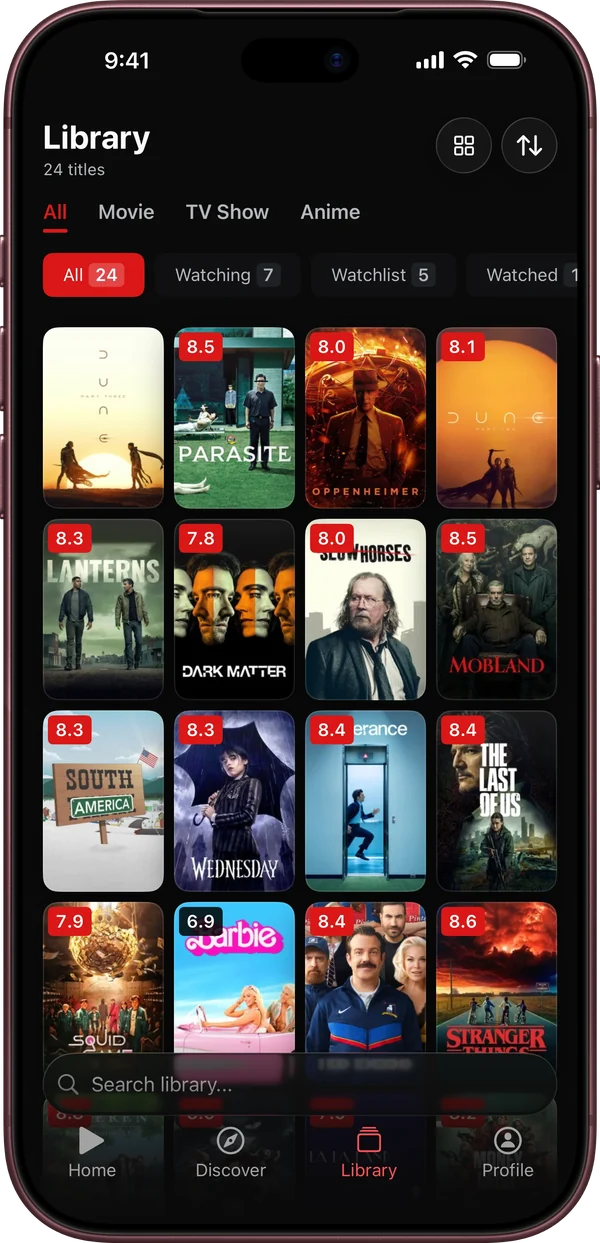
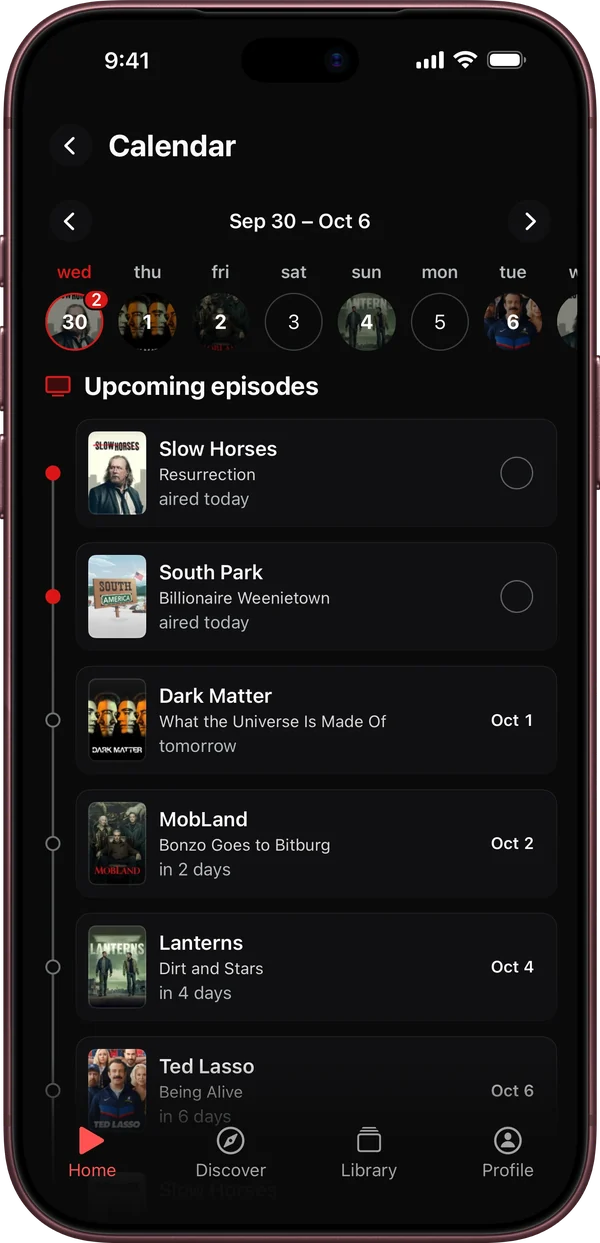
Watchd: no account, everything on your iPhone
Watchd tracks TV shows, movies and anime in one library. It is free, with no ads, no subscriptions and no in-app purchases. There is nothing to sign up for: your library, episode progress, ratings and lists are stored only on your iPhone. Show and movie info comes from TMDB.
What it doesn’t do: it runs only on iPhone with iOS 17 or later, there is no Android or web version, and your library doesn’t sync between devices. Because the data lives on the phone, save a backup from time to time (Profile → Data → “Backup”) and keep the file in Files or iCloud Drive. It has no social features either, so no reviews or friends. More answers are in the Watchd FAQ.
Other trackers worth knowing
- Trakt has a website and apps for iPhone, Android and Apple TV, and you need an account. It can log what you watch automatically: Infuse sends plays to Trakt, and Plex can too if you have Trakt VIP and Plex Pass. The free plan has limits; VIP is $59.99 a year.
- Letterboxd is the best-known film diary, on the web, iPhone and Android. It covers films only, not TV series.
- Serializd is for rating and reviewing TV shows with friends. TV only, with an account, free with ads.
- JustWatch shows where a title is streaming and also tracks episodes. An account is only needed to sync between devices.
- Simkl covers TV shows, anime and movies on the web, iPhone and Android, and is strong on anime.
The longer list, with prices and which apps import a TV Time export, is in the best TV Time alternatives. Watchd against Trakt, Serializd and Letterboxd point by point: the comparison table.
Quick answers
What is the easiest way to keep track of TV shows I’ve watched? A tracker app that remembers the last episode you saw and shows when the next one airs. Mark each episode right after you watch it.
How do I know if a show I watch has a new season or episode? Add it to a tracker app. Watchd, for example, lists upcoming episodes in its calendar, with notifications, and new seasons show up on their own.
Can I see everything I’ve watched on Netflix? Yes. In a web browser: Account → Profiles → choose a profile → Viewing activity. “Download all” saves it as a CSV file.
Is there an app to track movies and shows without an account? Watchd on iPhone works with no account at all. JustWatch asks for one only to sync between devices.
Can I use a spreadsheet instead? For films, yes. For series it gets tedious: you type every episode by hand, and nothing reminds you when a show comes back.
Which way to choose
- You watch a few films a month: a notes list or Letterboxd.
- You follow several series on different services and don’t want an account: Watchd on iPhone.
- You watch through Infuse or Plex and want episodes logged automatically: Trakt.
- You want to talk about TV with other fans: Serializd.
- You mostly need to know where something is streaming: JustWatch.